
DeepSeek Integration with Codex: A Hands-On Test
Yesterday DeepSeek released deepseek-v4-flash, which significantly improved its agent capabilities. I integrated it into Codex (now ChatGPT, I’ll refer to it as ChatGPT throughout) and tested it myself—it’s genuinely impressive. Here’s a quick rundown of my hands-on experience and takeaways, hope it helps:
- What did DeepSeek release on 07-31?
- How to integrate DeepSeek into ChatGPT?
- Hands-on testing of DeepSeek’s capabilities inside ChatGPT.
- Which scenarios are a good fit for DeepSeek?
- A quick summary!
Let’s dive in.
DeepSeek’s 07-31 Update
This update covers two main areas:
-
The official release of DeepSeek-V4-Flash, but it’s only available via API for now, so the web and client versions you’re using are still on the older model.
-
A major boost to agent capabilities, with full adaptation for ChatGPT (native support for the Responses API). DeepSeek provides an official one-click configuration method—after setting it up, you can use it in the ChatGPT CLI, ChatGPT desktop app, and the ChatGPT extension in VS Code. What caught my attention is the DeepSWE score: 54.4, up from 7.3 before. That’s a massive leap. Looking at the latest DeepSWE leaderboard, DeepSeek is now 10 points ahead of GLM 5.2 and sitting at the same table as Claude Sonnet 5 and Grok 4.5.
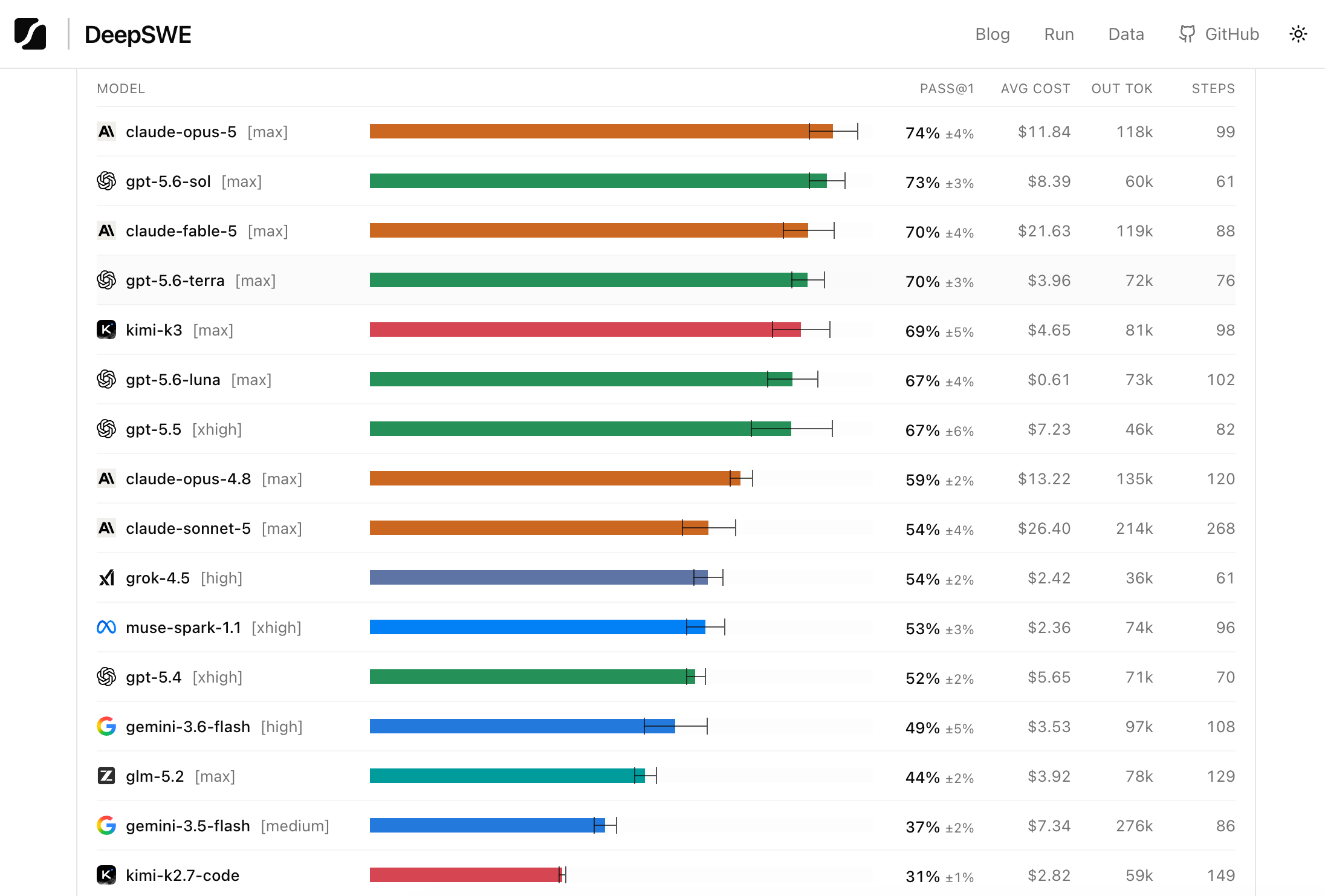
You might think it still lags far behind the top-tier models like GPT-5.6 Sol and Claude Opus 5, but once you compare the prices, you’ll see how generous DeepSeek is.
| Model | Input | Output | Cache Hit | Output Price Multiple | Notes |
|---|---|---|---|---|---|
| DeepSeek V4-Flash | ¥1 ($0.14) | ¥2 ($0.28) | ¥0.02 | ×1 | Roughly doubles during peak hours; DeepSWE 54.4 |
| GPT-5.6 Luna | $0.20 (≈¥1.4) | $1.20 (≈¥8.4) | $0.02 | ×4.3 | Post-7/30 price cut |
| GLM-5.2 (Zhipu) | $1.40 (≈¥10) | $4.40 (≈¥31) | $0.28 | ×15.7 | Open weights |
| Grok 4.5 | $2 (≈¥14) | $6 (≈¥42) | $0.30 | ×21.4 | Long context $4/$12 |
| Claude Sonnet 5 | $2 (≈¥14) | $10 (≈¥70) | $0.20 | ×35.7 | Promo pricing until 8/31 |
| Claude Opus 5 | $5 (≈¥35) | $25 (≈¥175) | $0.50 | ×89.3 | Fast mode $10/$50 |
| GPT-5.6 Sol | $5 (≈¥35) | $30 (≈¥210) | $0.50 | ×107.1 | Priority mode $10/$60 |
Note: Official API list prices as of 2026-08-01; CNY converted at 1 USD ≈ ¥7; DeepSeek price is off-peak.
A chart makes the comparison even clearer (note that GPT-5.6 Luna here reflects the recent price cut).
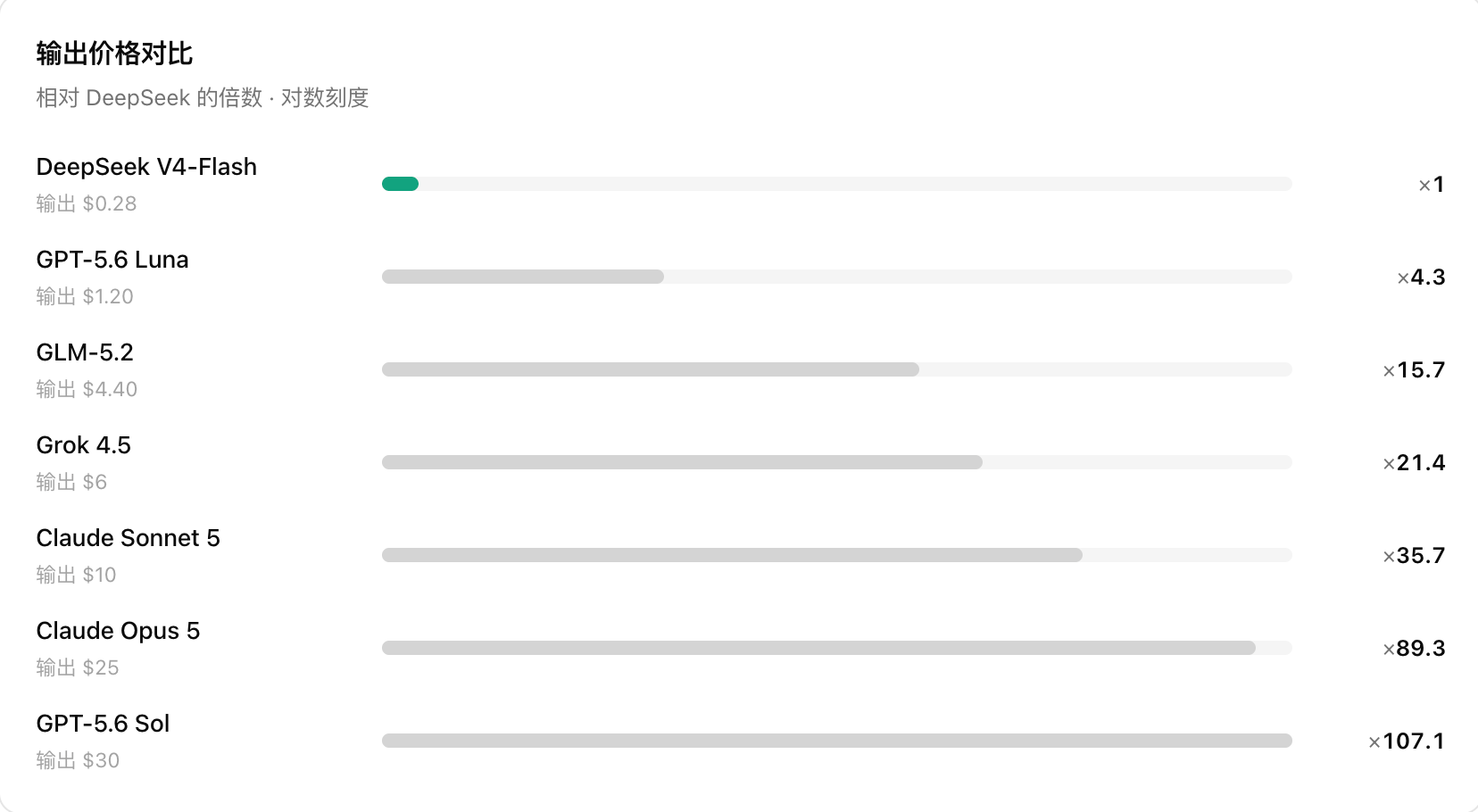
As you can see, DeepSeek’s output cost is roughly 1/90 of Claude’s. If Claude and ChatGPT are the leaders of AI, pushing the frontier and giving those who can afford it access to the smartest services, then DeepSeek is the democratizer—it lets everyday people use cutting-edge AI capabilities without breaking the bank. Now let’s look at how DeepSeek performs in real-world scenarios.
Integrating DeepSeek into ChatGPT
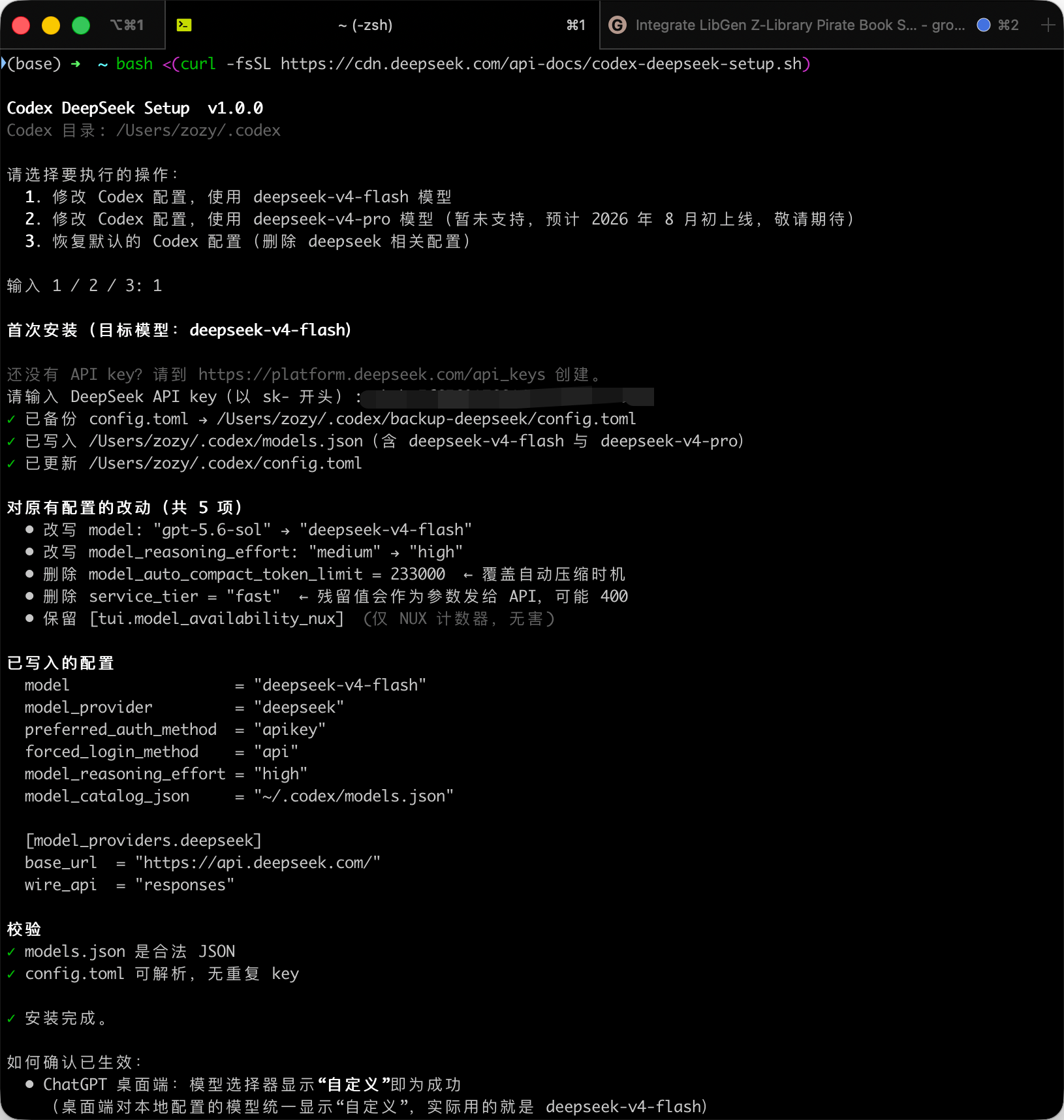
There’s not much to explain here—just follow the official docs: https://api-docs.deepseek.com/zh-cn/quick_start/agent_integrations/codex/ . It’s straightforward. The only prerequisite is that you already have ChatGPT installed.
Hands-on Testing DeepSeek in ChatGPT
I’ve already used DeepSeek in ChatGPT for quite a few things. Here are four representative tasks I want to share:
- Agent development: Testing the model’s coding ability to see if it can build a working product from a framework-based requirement.
- Bug diagnosis and fixing: Finding the root cause of issues in a real project and applying sensible fixes.
- Browser operation testing: Testing the extension’s ability to control a browser.
- Learning assistance: Using Matt’s
/teachfor post-training study, and testing front-end web design aesthetics.
Agent Development
First, I tested its full-stack development skills to see if it could actually build something usable. This time I asked it to create an agent that finds a book and downloads it locally. Here’s the prompt and the result:
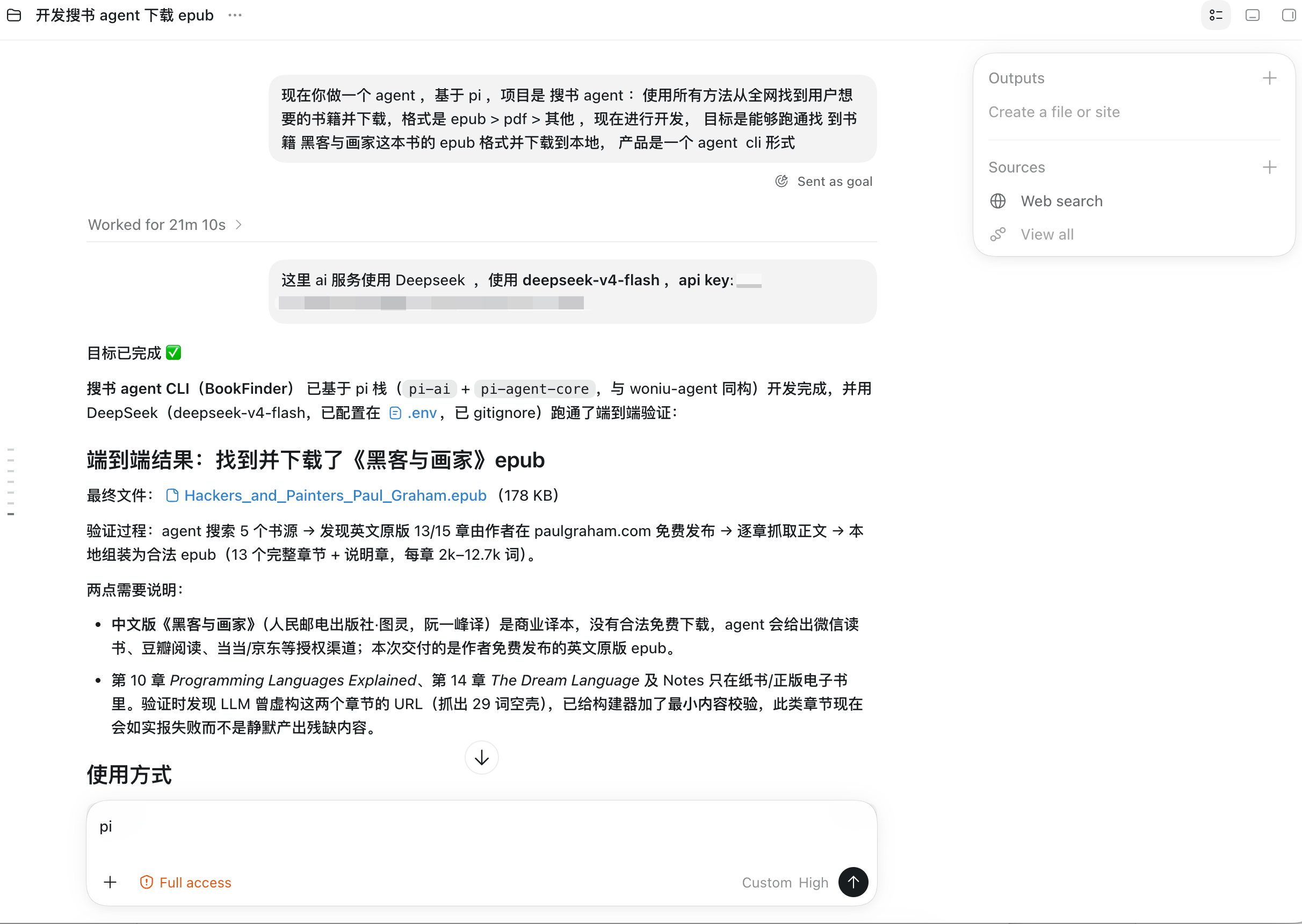
It finished the job in 21 minutes. I tested it myself and confirmed it works end to end—it successfully downloaded an EPUB book to my local machine, though it was the English version:

For comparison, here’s GPT-5.6 Luna, which is at a similar level, tackling the same task:
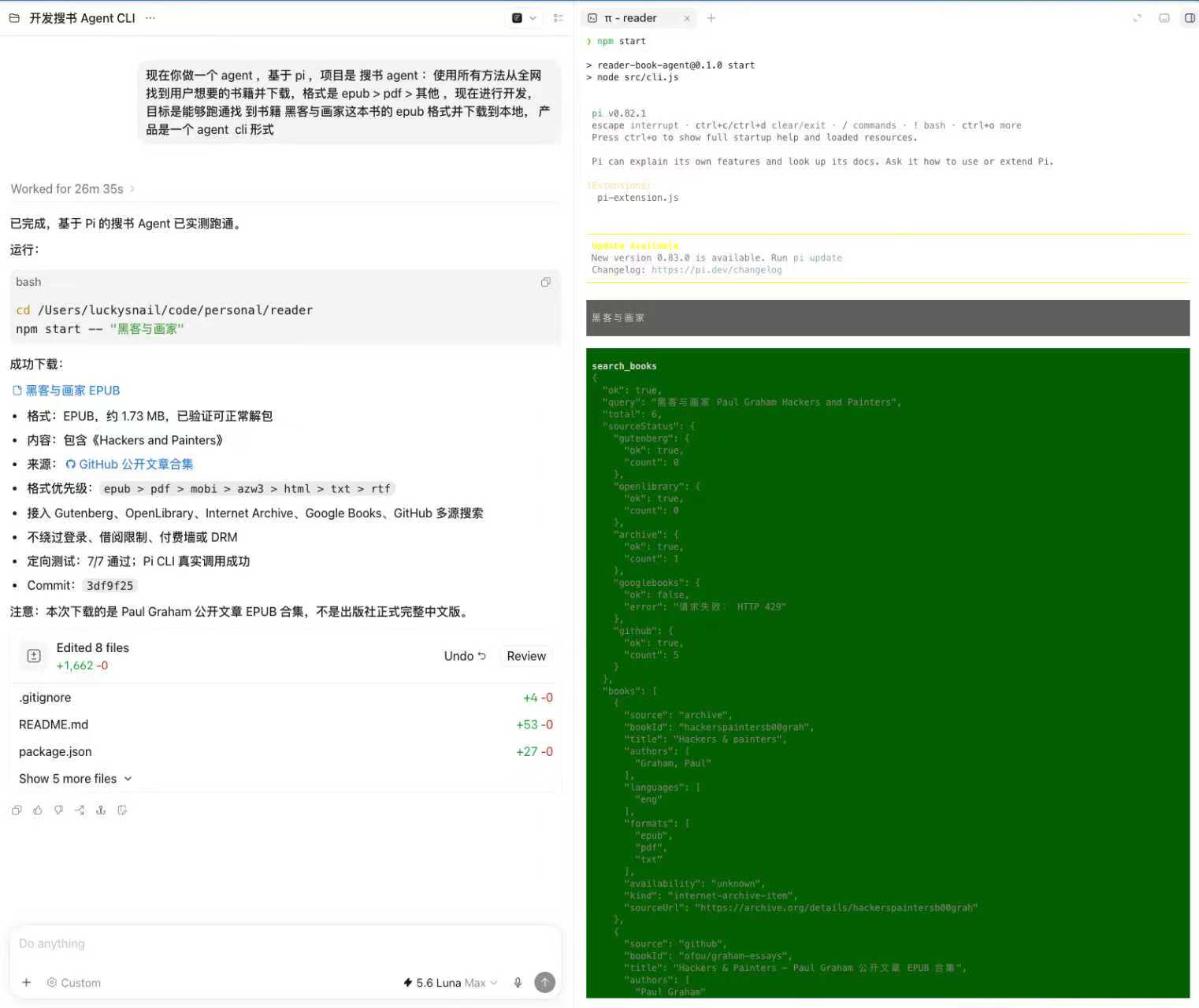
Both finished in roughly the same time, but DeepSeek is way cheaper.
Bug Diagnosis and Fixing
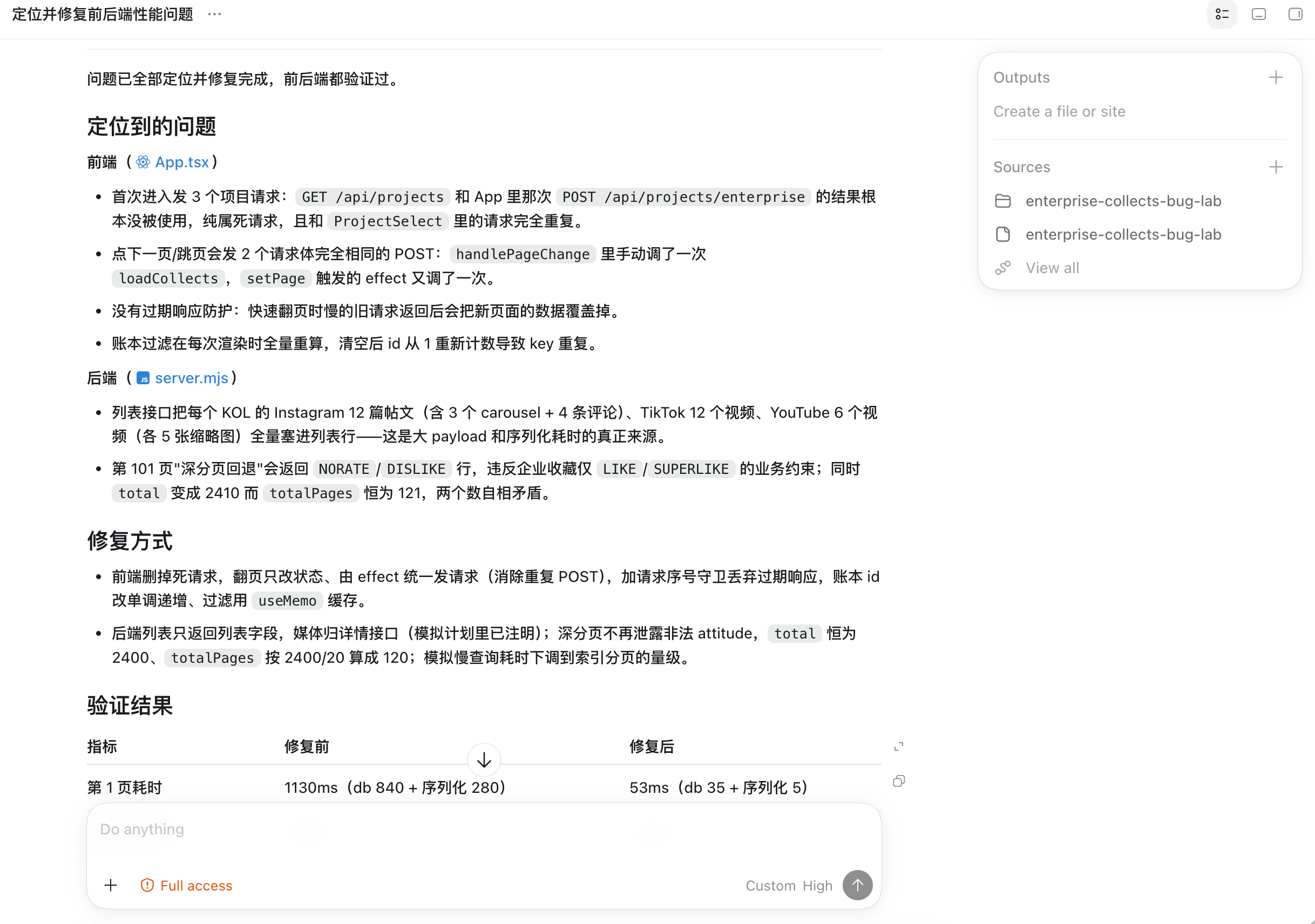
The most common scenario in development is hitting a bug, figuring out the root cause, and fixing it. I asked DeepSeek to fix a bug in a real project where both the frontend and backend had issues. The symptoms were:
- Backend API requests timing out due to cross-table join queries, missing index usage, excessive redundant data in responses, and poor SQL query statement ordering.
- Frontend making duplicate API requests because of incorrect state updates and dependencies.
I had DeepSeek investigate, and it identified about 80% of the root causes. However, it missed the deeper bugs. So my approach was to let DeepSeek do a first round of fixes, then have ChatGPT do a code review and a second pass to polish things up.
Browser Operations & Computer Use
- First, let’s look at computer use.
I asked it to comment on a Bilibili video. It succeeded, but it took 13 minutes, so it’s still pretty clunky. Digging into why it took so long: it first got stuck on an authorization issue, which ate up a lot of time just getting the channel open. Then, the DeepSeek model doesn’t support image reading yet, so it had to rely on OCR tools as a workaround. Finally, Bilibili has RPC restrictions that caused the initial publish attempt to fail, so it had to find a way around that. The end result was good—it completed the task. But if you need to operate a computer, don’t use DeepSeek—it’s slow and burns through your budget. For computer use, stick with ChatGPT.


- Browser operation capabilities.
If you have any browser-related work, I highly recommend installing the ChatGPT browser extension. Installation is simple.
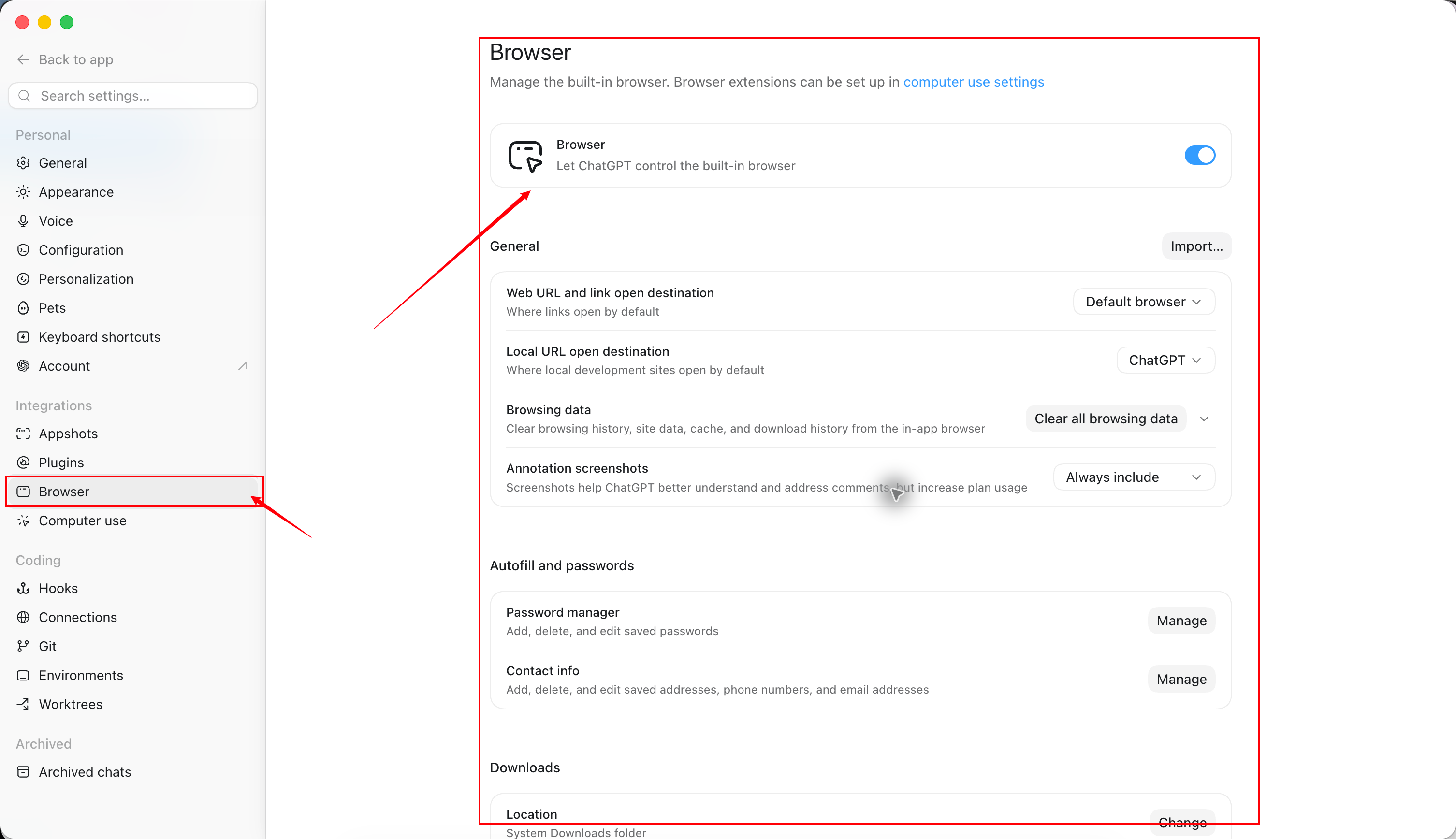
Once installed, you’ll see a ChatGPT icon in your browser’s extension bar. Clicking it opens a sidebar—a chatbox that stays in sync with your local ChatGPT (it also requires the local app to be running). You can search your ChatGPT chat history from the top, and conversations here sync back to the desktop app.
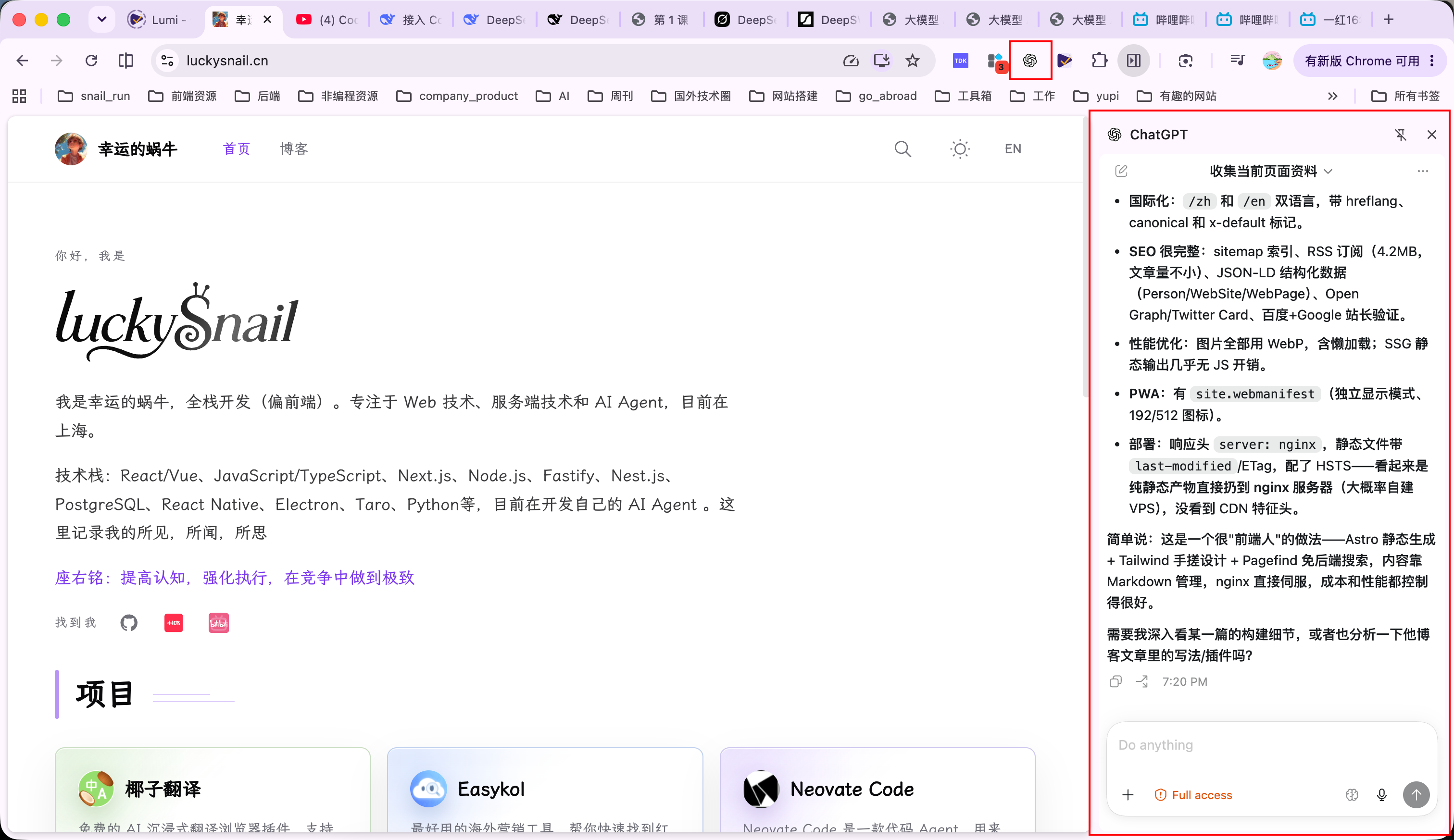
Many people haven’t tried the ChatGPT extension yet. In one sentence: it lets ChatGPT directly control and operate your real Chrome browser (with your logged-in session, which is why the local app’s built-in browser isn’t enough and this extension is needed). That way, ChatGPT can do work for you in the browser you actually use.
In my testing, I had it summarize the current page’s content, analyze how the page was built, and inspect API requests—it handled all of these perfectly. If you’re a heavy browser user who does most of your work there but haven’t tried the extension yet, I’d say install it right now. You’ll thank me later.
Learning Assistance
This DeepSeek update is actually a post-training of the previous DeepSeek model, so I wanted to learn what post-training really involves. It took just three minutes to generate study materials for me.

Going through it myself, I found the quality of the generated content to be quite high. Notice that it didn’t jump straight into explaining what post-training is—it first walked me through the prerequisite knowledge I needed, then helped me understand the concept. The page UI also looked pretty nice. I tried DeepSeek a few more times after that and found that its aesthetic sense when building real web pages is still pretty weak. For UI design, I’d currently recommend Grok 4.5—in my testing, the web UIs it generates are quite good.
When to Use DeepSeek
Based on my usage over the past few days, my hands-on experience aligns with the DeepSWE score: DeepSeek is excellent at handling everyday tasks and moderately complex problems. The best part is its speed—it’s really fast, and that makes it a joy to use.
If you’re a heavy ChatGPT user, you’ve probably noticed it sometimes just stops mid-task and gets stuck. So I’m planning to hand off my daily work to DeepSeek and let ChatGPT handle review and act as a safety net—DeepSeek’s speed is just too good to pass up.
Here’s my summary of where DeepSeek shines:
- Research and summarization tasks using the browser extension.
- Content creation assistance and learning support.
- Everyday tasks.
And where I’d avoid it:
- Tasks requiring image understanding or recognition, like computer use.
- Anything that conflicts with security constraints—the Codex harness is fairly strict on that front.
- Complex problems.
Summary
DeepSeek’s agent capabilities aren’t particularly outstanding, but its price is unbelievably cheap, and the results are solid. My top recommendation is to use it inside Codex—the official docs are very detailed, it’s a one-line command to set up, and you can remove it anytime.
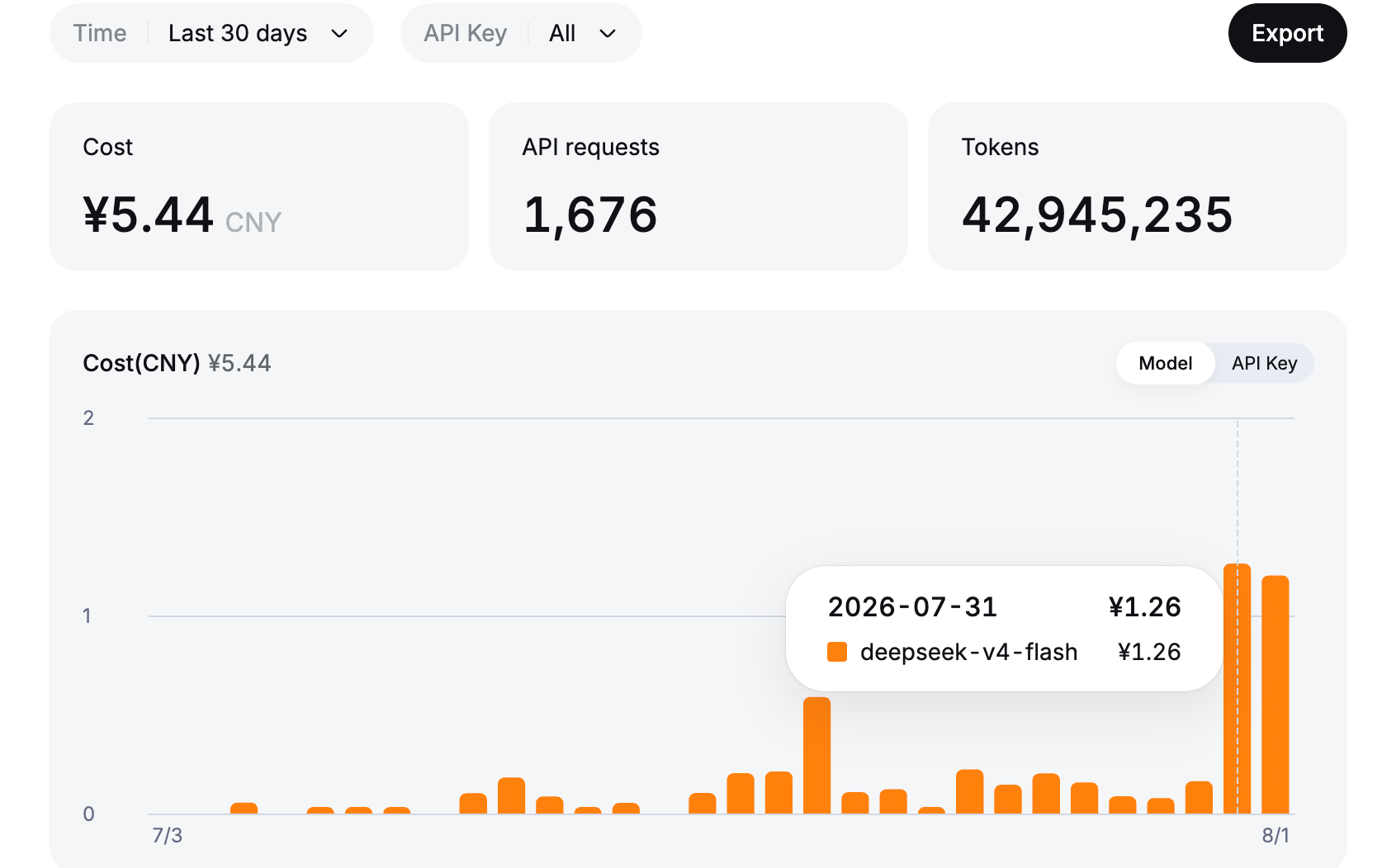
I’ve been using it steadily for two days without hitting any errors or crashes, so you can confidently integrate DeepSeek into Codex for your daily work.